Hello Retool Community,
I am a beginner using Retool Cloud. My organisation currently opens the new AI-powered App Builder.
I need to create a new application using the original Retool Classic App Builder (the drag-and-drop editor), because a technical job assessment requires:
Retool Classic App Builder.
SQL queries analysed and executed directly through SQL.
No generative AI or automated app builders.
I already have a Retool Database with two tables and would like to reuse this database.
Could someone please explain:
Is Classic App Builder still available for Retool Cloud?
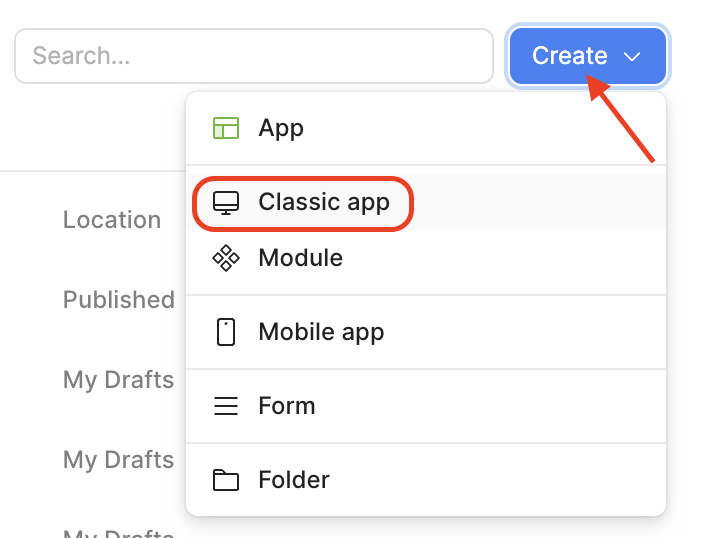
How can I create a new Classic application in my existing organisation?
Is it available on the Free plan?
Can you provide the exact steps or a direct link?
Thank you for your help!
My goal:
Issue:
Steps I've taken to troubleshoot:
Additional info: (Cloud or Self-hosted, Screenshots)
A beginner on Retool Cloud whose organization defaults to the new AI-powered app builder needs to create a brand-new app in the original Classic (drag-and-drop) app builder—using direct SQL queries and no generative AI—for a technical job assessment, and wants to reuse an existing Retool Database.
AI Response
The Classic drag-and-drop app builder is still available and supported on Retool Cloud, even though new feature development is now focused on the AI app builder. To start a fresh classic app, open the 'Create new' menu from the Retool home/apps page and choose the option to create an app with the classic editor rather than describing an app to the AI builder; from there you can build the UI by dragging components onto the canvas. The classic editor fully supports writing and executing SQL directly in SQL mode (read) or GUI mode (write) against resources, so you can connect your existing Retool Database and run raw SQL queries with no AI involvement. Classic app functionality is documented as available across plans, so it is usable on a Free Retool Cloud account.
Sources
General availability of app builder
Retool's own GA announcement explicitly confirms that classic apps built with the drag-and-drop IDE are still supported and maintained on Cloud. Classic app IDE | Retool Docs
Documents the Classic app IDE (drag-and-drop canvas and SQL-mode queries), confirming it remains available on Cloud and supports running SQL directly without generative AI.
The Community Team is testing out a new automation. Let us know if it's helpful (or not) by leaving a , , or . Or by marking this post as the "Solution"! Let us know if you have any feedback here.
Yes, the Classic App Builder (the drag-and-drop editor) is still available on Retool Cloud. Just keep in mind that new feature development is focused on the AI app builder:
That opens the drag-and-drop editor with no AI involved. In its query panel you can write SQL directly against your Retool Database resource, so your two existing tables can be reused. More on classic apps: Classic app IDE | Retool Docs
If Classic app doesn’t show up in your menu, let me know and I’ll dig in!

 ,
 , or
 . Or by marking this post as the "Solution"! Let us know if you have any feedback